

Raptive sets its entry test in pageviews and in the share of traffic that comes from five countries, and a site can meet one without the other. This guide reads Raptive’s own Help Center as it stands on 27 October 2026, explains each condition, shows how to check it in Google Analytics and describes the application as Raptive presents it. It is one part of our guide to what each ad network officially requires (opens in a new tab), where Raptive sits next to the other options.
Raptive’s eligibility as its Help Center lists it
Raptive’s “Who is eligible” entry, updated on 26 September 2026, sets a minimum of 25,000 pageviews a month and splits the other conditions by pageview range. Its Google Analytics article, updated on 1 October 2026, repeats the traffic part and says the 25,000 pageviews are counted within the last 30 days.
| Condition | 25,000 to 99,999 pageviews | 100,000 pageviews and above |
|---|---|---|
| Traffic from the United States, United Kingdom, Canada, New Zealand and Australia | 50% | 40% |
| A site build that makes it easy to add, configure and manage ads | Listed | Not listed |
| Long-form content on the majority of pages | Listed | Not listed |
| High-quality, original content with meaningful human involvement | Listed | Listed |
| Google Analytics correctly set up | Listed | Listed |
| Domain at least 6 months old | Listed | Listed |
Where Raptive’s own pages differ
Raptive’s FAQ entry, updated on 21 November 2025, lists the site build and long-form content conditions for every site, next to the 50% and 40% figures. It also says the majority of traffic should come from the key countries. The newer eligibility entry lists the build and long-form conditions only for the 25,000 to 99,999 range and does not repeat the majority wording. When two Raptive pages disagree, this guide follows the newer one. Read the eligibility entry again on the day you apply.
What each condition means
Monthly pageviews
Raptive’s Google Analytics article says the minimum is 25,000 monthly pageviews within the last 30 days. A pageview is not a session. Google defines Views as the number of web pages your users saw, with repeated views of one page counted, while a session is a period during which a user interacts with your site and can include many views.
Traffic share from five countries
The five countries are the United States, United Kingdom, Canada, New Zealand and Australia. Raptive’s entry says “50% of traffic” and “40% of your traffic” without saying whether traffic means sessions, users or pageviews. Check the share in more than one unit, and ask Raptive if the answer changes which range you fall into.
Domain age
Raptive asks for a domain at least 6 months old. Analytics does not show this. The registration date is in the records of the registrar where you bought the domain.
Site build and content
For the 25,000 to 99,999 range, Raptive asks for a site build that makes ads easy to add, configure and manage, and long-form content on most pages. The pages read give no word count for long-form. For every range, Raptive asks for content that is high quality, original and has meaningful human involvement, and it does not define that phrase on the pages read.
Google Analytics set up correctly
Raptive’s application needs Google Analytics 4. It says an authorization error usually means the account is Universal Analytics, and that sites with more than one data stream can see inflated pageviews in the application. Raptive’s help article says some analytics plugins create a second data stream, which doubles the pageviews counted, and that you should pick the data stream that best represents your true traffic. It points to the Engagement events report, with Stream name as a secondary dimension, as the place to compare streams.
How to check each condition in Google Analytics
Use the same 30-day window for every check, ideally the last 30 days up to the day before you apply.
- Go to your Google Analytics property and select the Reports tab.
- Set the date range to the last 30 days.
- Find your Views, the metric Google defines as the number of web pages your users saw. Compare the total with 25,000 and, if you are near 100,000, with that line too.
- In an exploration, use the Country dimension, which Google defines as the country from which user activity originated, together with Views and Sessions.
- Add up the five countries and divide by the site total. Do this once for Views and once for Sessions, then compare each result with 50% or 40% depending on your range.
- Look at the data streams of the property. If two streams show similar pageviews, the total is inflated and Raptive’s help article says the true figure is closer to one of them.
- Look up your domain’s registration date with your registrar.
Google’s help says session metrics are an estimate and can differ slightly between reports. Raptive says it reviews more than the minimums: pageviews, sessions, pages per session, country demographics, time on page, top posts and traffic sources. A site that meets the numbers is not guaranteed to be approved.
Check your export with an AI assistant
If you have exported your numbers, an assistant can do the percentages. This prompt works in ChatGPT, Claude, Gemini or any AI assistant. It uses only the eligibility text you paste and your own numbers, so it cannot add a rule that Raptive did not publish. Replace the text in square brackets first.
I run a blog about [your niche]. I want to check my site against Raptive's published eligibility.

The eligibility text, copied from Raptive's Help Center on [date you read it]: [paste the text of the "Who is eligible for Raptive" entry].

My Google Analytics numbers for the last 30 days: total Views [number], total Sessions [number], and Views and Sessions for each country [list every country with its Views and Sessions]. My domain was registered on [date].

Work out the share of Views and the share of Sessions that come from the five countries named in the text, show the arithmetic, and say which pageview range I fall in. For each requirement in the pasted text, write one line with the requirement, my number and one of "met", "not met" or "cannot tell from this data". Do not add requirements that are not in the pasted text, and do not use any figure that is not in my message.
Treat “cannot tell” as a task. The missing number is in your analytics or on Raptive’s page, not in the assistant.
The application as Raptive describes it
Raptive’s application, read on 27 October 2026, starts on a page titled “Let’s get started! First, tell us about your site.” The first screen asks whether you are an active Raptive creator, whether you are the sole owner of the site, what the site is primarily about, whether you currently run ads and which ad networks you use, and how you heard about Raptive. This guide read only that screen and did not fill it in, because the later steps need your own details.
Raptive’s Google Analytics article says a read-only authorization of your Google Analytics account is mandatory to submit an application, and that Raptive uses it only to review your application. It advises you not to remove the authorization until you have a decision.
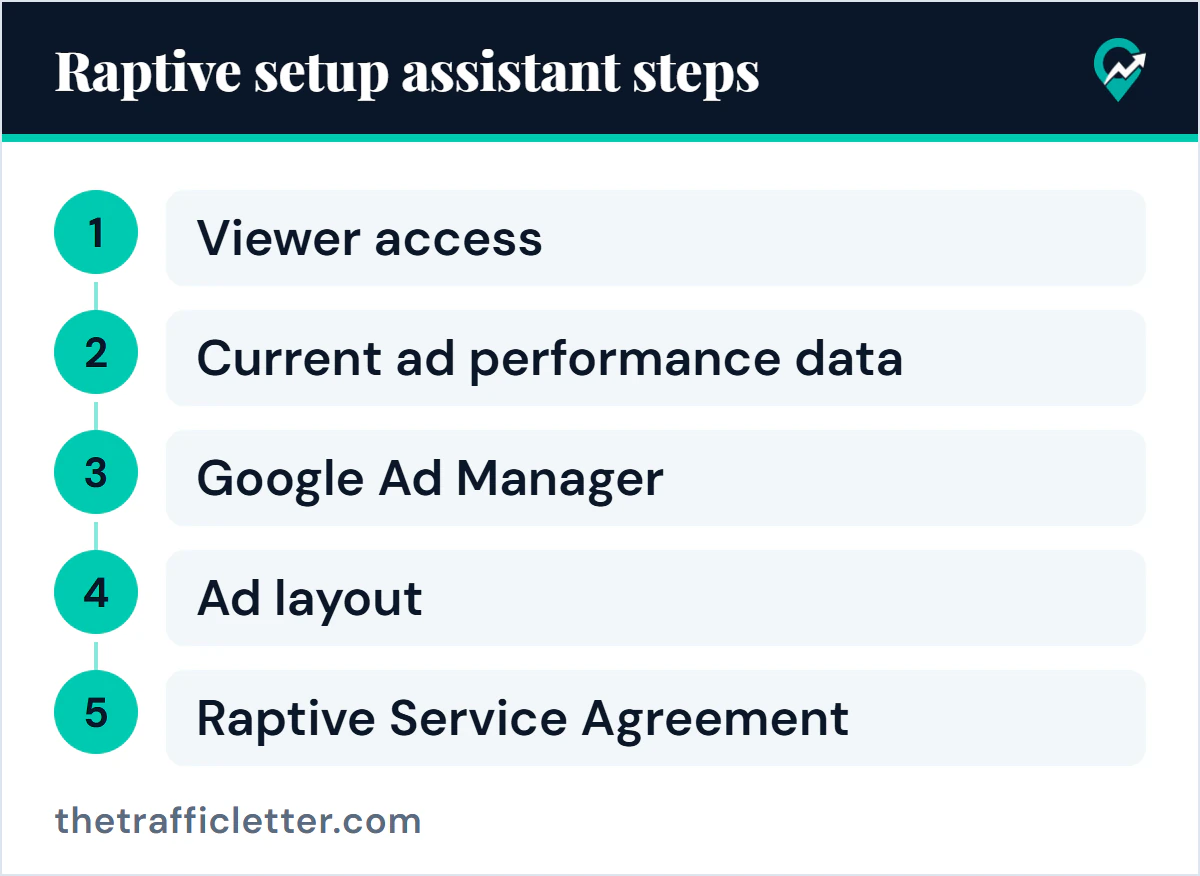
The FAQ entry, updated on 21 November 2025, describes what happens next. After submitting, you should receive an email acknowledgment right away, and reviews typically take a day or so but could take longer. Once the site is approved, Raptive starts you on its Setup Assistant:
- Give a Raptive user Viewer access to your Google Analytics account.
- Share your current ad performance data, or work with Raptive by email on a layout if you do not run ads yet.
- Create or link a Google Ad Manager account, and update your ads.txt file with the required lines.
- Raptive analyzes your site and designs an ad layout. You have the final say on placement, and Raptive says it requires a minimum of two ads running in highly viewable locations on each device.
- Before installation: fill out a Comscore traffic assignment letter, choose to self-install or have Raptive install, add an advertiser privacy statement to your privacy policy, verify your identity, submit payment and tax information and accept the Raptive Service Agreement.
Raptive’s ad layout article, updated on 22 January 2026, repeats that its ad partners require at least two highly viewable ads across all device types.
If you are not eligible yet
Compare the conditions you miss before you decide where to put your effort. A site short on pageviews has a traffic job. A site with enough pageviews but a low share from the five countries has an audience job, and a site that is simply too young needs time.
Other programs have other tests. Mediavine’s Journey counts sessions from Tier 1 countries, which our guide to how the Journey program counts sessions (opens in a new tab) covers, and Ezoic counts monthly active users, covered in the guide to Ezoic’s requirements and the Incubator (opens in a new tab). Google AdSense’s eligibility page lists no traffic minimum. The traffic itself is the long-term work, and our guide to Pinterest as a source of blog visitors (opens in a new tab) covers one source.
What this guide does not cover
Raptive also runs Raptive Community, a separate program with its own application, which is not covered here. Raptive publishes a separate RPM guarantee with its own conditions, and this guide does not quote earnings, revenue share or payment terms. Revenue per thousand visits depends on your own traffic mix, and our guide to page RPM and session RPM explained (opens in a new tab) shows how to measure it.
Right after: your next actions
- In Google Analytics, write down your Views, Sessions and the five-country share for the last 30 days.
- Compare each number with the table above and note which conditions you cannot yet prove.
- Read Raptive’s eligibility entry again on the day you apply, then compare other routes in the full comparison of ad network requirements (opens in a new tab).